
Activate a
Data Roaming Plan
Designed to match your travel needs
and Enjoy In-flight Data Roaming


Enjoy uninterrupted connectivity wherever you go!
Select a country to see what we have in store for you
View package terms and conditions and other activation details
Stay Connected Worldwide
Check your roaming status, explore roaming plans, and get support for your journey.
Check out all additional roaming services

Autopay
Automatically recharge your roaming plans and add-ons when your balance runs low, ensuring uninterrupted connectivity while abroad.

Credit Limit Enhancement
Instantly increase or adjust your credit limit within the allocated quota to enjoy seamless roaming without interruptions.

Budget Setter
Set spending limits and manage your roaming usage to stay in control of your expenses while traveling.

Roaming Announcement
Notify callers that you are overseas and avoid unnecessary calls, with the option to activate or deactivate the service anytime

In-flight Data Roaming
No more stress over activating multiple plans to get Data roaming while in the air and on the ground!
Roaming Help & Quick Actions
Everything you need to activate, manage, and troubleshoot roaming while travelling

Having trouble connecting to roaming?
First Switch OFF your phone and then switch it ON again.

Manual Network Selection
If your phone doesn't automatically connect abroad, manually selecting a network can quickly restore your roaming service.
LEARN MORE
APN & Mobile Data Setup
Having trouble using mobile data while roaming? Updating your APN settings can help restore internet connectivity.
LEARN MORE
Enable Data Roaming on Your Device
Turn on data roaming in your device settings to allow your phone to use mobile data on partner networks abroad.
LEARN MORE
Turn on Data Roaming via the MyDialog App
Ensure that Data Roaming is activated on your MyDialog App.
LEARN MORE
Activate a Roaming Plan
Activate a roaming plan through the MyDialog App or dialog.lk. Choose the package that best suits your needs.
LEARN MORE
Check where your plan works
Browse roaming countries and supported network types before you travel.
- Power your global journey - seamless connectivity across 170+ destinations
- Unlock the future of roaming - 5G access in 70+ countries
Need Help?
We're ready to help, whenever you need us.



அடிக்கடி கேட்கப்படும் கேள்விகள்
There are several convenient ways to manage your roaming service:
- MyDialog App
- www.dialog.lk
- USSD (#678#)
- WhatsApp DIA Bot (777678678)
- Roaming service activation and deactivation
- Data plan activation and deactivation
- Data usage monitoring
- Bill amount and online payment options
- Package details
To manage your roaming usage economically and avoid unexpected charges, please follow the recommendations below.
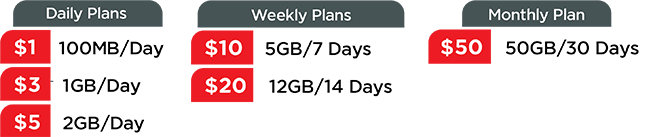
- If you are using the minimum data plan (USD 1 Daily Data Roaming Plan), ensure that automatic updates are disabled to prevent unnecessary data usage.
- Smartphone users are advised to change automatic internet-based updates to manual mode.
- Disable automatic updates for Windows, applications, and anti-virus software on your phone or laptop.
- Cancel all conditional call divert or forwarding options before departure.
- Always enable automatic keypad lock to avoid accidental calls or SMS usage while roaming.
Yes, you will be able to make and receive calls, send SMS, and use data in-flight. Visit In-flight Data for more information.
Direct dialing
Making a call within the country you are visiting
- Example: calling the Vodafone customer care hotline while roaming in Australia.
- Australia country code: +61
- Enter the number as: +61400123456
Calling Sri Lanka while roaming
- Example: direct dialling to Sri Lanka (Dialog Roaming Hotline) from the UK.
- Sri Lanka country code: +94
- Enter the number as: +94771234567
Calling home using the Call Home method at an affordable rate
- Postpaid - *#100*0094xxxxxxxxx#
- Prepaid - *#102*0094xxxxxxxxx#
Direct SMS
Sending an SMS within the country you are visiting
- Example: sending an SMS within Australia while roaming in Australia.
- Australia country code: +61
- Enter the number as: +61 xxx xxx xxx
Sending an SMS to Sri Lanka while roaming
- Example: sending an SMS to Sri Lanka while roaming in Australia.
- Sri Lanka country code: +94
- Enter the number as: +94 xxx xxx xxx
Sending SMS home using the SMS Home method at an affordable rate
- SMS Home code: *#101*94xxx xxx xxx#
Yes. While roaming, you will receive real-time notifications regarding your interim bill value and roaming usage when your usage reaches the following thresholds:
- Rs. 2,500, Rs. 5,000, Rs. 10,000, Rs. 25,000, Rs. 50,000, Rs. 100,000, Rs. 200,000, Rs. 500,000, and Rs. 1 million
- Example: Dear Customer, please be informed that your roaming usage for the current month is approximately Rs. xxxxx/- and your total outstanding amount is approximately Rs. xxxx/-.
- Roaming usage = roaming voice + roaming SMS + roaming data
- Total outstanding amount = roaming usage + local usage